Your Classroom’s New Sidekick: Using Google Gems and the A.I.D.E. Framework to Architect Intentional Instruction
By: LaConti Bryant
Imagine this…it’s 8:30 p.m. on a Sunday night, and you are still working on tomorrow’s lesson plan. The activity you want to implement seems engaging, but one question lingers in your mind: Will this actually help my students achieve the learning objective?
Many preservice and early‑career teachers spend countless hours planning lessons but still feel a sense of uncertainty about whether those lessons will lead to meaningful learning for their students. The challenge is not a lack of effort or knowledge. More often, it is the absence of a clear design structure for planning effective instruction.
One helpful way to approach lesson planning is to think like an instructional architect. Architects design buildings with a lot of intention. This includes having clear blueprints, carefully aligning structure, materials, and purpose. In a similar manner, effective teachers design lessons by aligning learning goals, instructional activities, and formative and summative assessments.
Today, emerging artificial intelligence (AI) tools can support the lesson design process. When used thoughtfully, AI can function as a planning partner by helping teachers generate ideas, organize instruction, and differentiate academic and social supports for diverse learners.
Research suggests that generative AI can assist educators with content creation, assessment design, and instructional planning while teachers maintain control over classroom decisions (Holmes, Bialik, & Fadel 2019; Luckin et al. 2016).
Meet Your Virtual Mentorship Suite: What are Google Gems?
For a busy teacher, the biggest challenge to using AI is the time it takes to "set the stage" for every new prompt. Well, there is a solution: Google Gems. Google Gems solve this problem by allowing you to create a custom teaching assistant that lives permanently in your sidebar.
A Gem is a customized version of Gemini. It is built once around a specific persona, set of instructions, and a knowledge base so that it behaves like a specialist rather than a general chatbot.
Think of a Gem as your own "pre-programmed" expert. Instead of explaining your grade level, your state standards, and your teaching philosophy over and over again every single time you log in, you build a Gem once, and it remembers those details forever. By building a Teaching A.I.D.E. Gem, you aren't just using a chatbot; you are creating a virtual support team who are ready to help you at 8:30 p.m. on a Sunday night or 7:00 a.m. on a Monday morning.
Understanding the A.I.D.E. Framework
Before building your Gem, it is important to understand the full framework you will be using. A.I.D.E. stands for:
A – Assign Role: Define the persona your Gem will take on (for example: veteran instructional
coach).
I – Identify Task: Tell the Gem what you want to build (a lesson hook, a differentiated activity, a
small group activity).
D -- Define Specifics: Provide the context the Gem needs such as grade level and the exact state
standard.
E -- Evidence of Learning: Ask for a specific way to measure whether students actually learned it.
The first step, Assign Role, happens once when you build the Gem. The remaining three steps: Identify Task, Define Specifics, and Evidence of Learning will happen every time you use the Gem. Knowing all four components upfront makes it easier to see how the one-time setup and the daily interaction work together.
Know Your State’s Policy Before You Build
Before bringing any AI tool into your classroom, find out what your state actually allows. State guidance on AI in K-12 education varies widely. That variance matters for how, and whether, you can implement something like a Teaching A.I.D.E. Gem.
Some states have published formal frameworks. Alaska’s Department of Education released its statewide AI framework built around seven gilding principles. Particular attention is given to equitable access for rural and remote districts. Ohio became the first state to legally require every public, community, and STEM school to adopt a formal AI policy. Idaho’s implemented framework required every district to adopt a local AI policy, set data privacy rules, and outlaw using AI to replace certified teachers.
Other states are pushing through legislation this year. Georgia’s SB179 makes computer literacy, which includes AI literacy, a high school graduation requirement starting with the class of 2031-2032. Virginia signed SB394 and HB1186 into law. This requires the state to issue AI guidance for K-12 school and create a pilot program to help school districts adopt AI responsibly. Oklahoma’s Responsible Technology in Schools Act requires every school district to adopt a written AI policy. The Act also prohibits AI from being the primary basis for grading, discipline, or placement decisions. Further, it protects a parent’s right to opt their child out of AI tool without academic penalty.
Some states, including Texas, have not yet issued formal statewide guidance. Texas has introduced legislation that is aimed at preventing AI from replacing classroom instruction, but the Texas Education Agency has not released a formal statewide AI policy. This has led to individual districts setting their own rules in the meantime. Some school districts have built multistep review processes requiring technical and curricular approval before a new AI tool reaches a classroom.
The practical takeaway: check your district’s policy and formal statewide guidance before you build your Gem. Protecting student data is not optional and “no policy yet” does not mean “no rules apply.” If your district does not have a formal AI policy, ask your administrator what is permitted before you start.
Step 1: Drafting the Blueprint (Assign the Role)
Let’s start by creating an instructional coach persona. Before creating a Gem, prompt Gemini to create a list of characteristics for this specific persona.
Example prompt to Gemini:
“What characteristics, responsibilities, and guiding principles should a veteran instructional coach with a strong background in data analysis have when supporting novice teachers?”
Typical output from Gemini might include the following:
- Deep knowledge of pedagogy, differentiation, and formative assessment
- Expertise in analyzing student data to guide instructional decisions
- Supportive, nonjudgmental coaching language
- Focus on practical, classroom‑ready strategies
- Ability to suggest scaffolds, enrichment, and targeted interventions
- Encouragement of teacher reflection and data‑informed planning
Teachers refine these characteristics to match their vision of a coach before creating the Gem.
Step 2: Building the Suite (The Setup)
At this stage, use the A – Assign Role step of the A.I.D.E. framework. After refining the instructional coach persona, it is time to create the custom Gemini Gem. Inside of Gemini, navigate the sidebar on the left to locate the Gems Manager. Next, click on Gems, from there scroll to the bottom of the page and click the “+ New Gems” button. Then, name your Gem (eg. AI Instructional Coach). Next, provide a short description (eg. lesson plan support). Copy and paste the refined input from Gemini in Step 1 into the description box. Finally, save the Gem. Once the Gem is saved it will permanently operate with this persona. This eliminates the need for daily prompting or “setting the stage.”
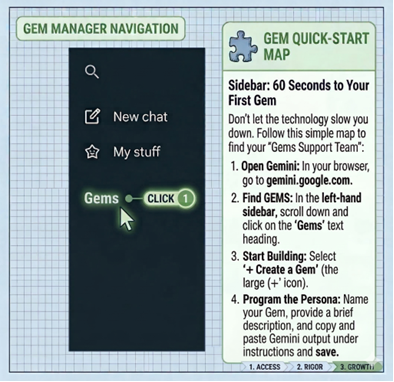 Figure 1: Navigational Blueprint for Accessing Google Gems and Building the A.I.D.E. (Image created with Gemini AI, 2026)
Once saved, the Gem permanently operates with this persona, so the role no longer needs to be reassigned in daily use.
Step 3: Putting the Sidekick To Work (The I.D.E. Interaction)
After the Gem is created, it’s time to interact with it using the remaining framework:
I – Identify Task-Tell the Gem what you want to build (lesson hook, differentiated vocabulary lesson, or small group activity)
D – Define Specifics- Provide the context, including grade level and specific state standard (5th grade math, TEKS 5.3B)
E – Evidence of Learning - ask for a specific way to measure student learning. This ensures that the lesson is not just an activity, but has a way to gauge student learning
This structure keeps prompts focused and ensures the AI produces actionable, classroom‑ready ideas.
Example of how to use the I.D.E. prompt:
- I – Identify Task: Suggest ways to differentiate a lesson activity
- D – Define Specifics: 5th grade fractions lesson, mixed‑ability classroom, aligned to TEKS 5.3B (Represent fractions and decimals using visual models)
- E – Evidence of Learning: Provide one scaffolded activity and one enrichment activity and please provide a 2-minute exit ticket to check for understanding.
Full prompt example (what a teacher would type to the Gem):
I am a 5th – grade teacher teaching a 5th – grade math lesson on fractions for a mixed‑ability classroom. The lesson must align with TEKS 5.3B (Represent fractions and decimals using visual models). Please suggest ways to differentiate the activity so all students can access the content. Provide one scaffolded activity for struggling learners and one enrichment activity for advanced learners. Please provide a 2-minute exit ticket to check for understanding.
This shows exactly how the I.D.E. steps translate into a single, actionable prompt, making it easy to copy or modify for lessons.
Foundations for Tomorrow (A 5 Minute Build)
You don’t need to become an AI expert to start experimenting. Here’s an activity you can do in 5–10 minutes:
- Ask Gemini to generate characteristics for your veteran instructional coach persona.
- Refine the list and create a new Gem with these characteristics.
- Use a simple I.D.E. prompt to generate a teaching suggestion for your next lesson.
Within seconds, you will have a set of activities to incorporate into your classroom. Even one small interaction with your Teaching A.I.D.E. can spark new instructional strategies and save valuable planning time.
Conclusion: Designing a Future with AI
By defining a veteran instructional coach persona, creating a Teaching A.I.D.E. Gem, and interacting with it using the I.D.E. prompt, new teachers get on‑demand instructional support. This system allows them to brainstorm lesson ideas, differentiate instruction, design assessments, and reflect on their teaching practice. AI is not a replacement for mentoring or professional judgment (Luckin et al., 2016). Instead, it serves as a practical, collaborative partner in the instructional design process. With a little practice, teachers can turn their AI assistant into a trusted, personalized instructional coach that grows with their teaching practice.
References
Google. 2024. Gemini [Large language model]. Google LLC. https://ai.google
Holmes, W., Bialik, M., & Fadel, C. 2019. Artificial Intelligence in Education: Promises and Implications for Teaching and Learning. Boston, MA: Center for Curriculum Redesign.
Luckin, R., Holmes, W., Griffiths, M., & Forcier, L. B. 2016. Intelligence Unleashed: An Argument for AI in Education. Review of Research in Education, 45, 148–176.
|
|
Dr. Bryant is a doctoral student at Liberty University. Her research focuses on AI, faculty development, human performance technology, and job‑embedded professional development. She is a former Instructional Systems Specialist with the federal government and is completing her second doctorate in Instructional Design and Technology. |